

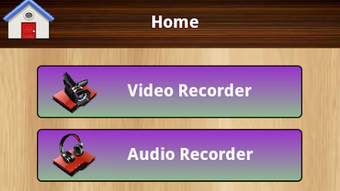
Description
Download Audio and Video Recorder Lite – Audio Recorder, Video Recorder, HD Recording, Flashlight Recording, External Mic Support
Overview
Audio and Video Recorder Lite is a free multimedia application designed for Android devices, enabling users to capture high-quality audio and HD video recordings directly from their smartphones or tablets. The app is developed by Android Developers Apps and is intended for individuals seeking a straightforward tool for recording audio and video without the need for complex setups. It caters to a broad audience, including students taking lecture recordings, content creators capturing on-the-go footage, and everyday users who need to document events or conversations. The app supports saving recordings to the SD card, ensuring easy file management and storage flexibility. A notable feature is its built-in flashlight integration, which allows users to record videos even in low-light environments. This functionality enhances usability in situations where natural lighting is insufficient. The app also includes a basic media player to preview recorded files directly within the application. While the free version includes advertisements, users have the option to upgrade to a premium version for an ad-free experience. The developer did not provide additional system requirements or detailed performance benchmarks.
Key Features & Capabilities
- HD Video Recording – Capture high-definition video directly from the device’s camera with minimal setup, ideal for vlogs, tutorials, and event documentation.
- High-Quality Audio Recording – Record clear audio with support for external microphones, enhancing sound quality for interviews, podcasts, and voice memos.
- Flashlight Integration – Use the device’s flashlight as a light source during video recording, enabling usability in dark or dimly lit areas.
- SD Card Storage Support – Save recordings directly to the SD card for better storage management and easy file transfer between devices.
- Built-in Media Player – Play back recorded audio and video files without requiring additional software, streamlining the review process.
- File Sharing Options – Share recordings via social media platforms, Bluetooth, or other sharing methods supported by the Android system.
- External Microphone Compatibility – Connect compatible external microphones to improve audio clarity, especially useful in noisy environments.
These features collectively support real-world use cases such as recording classroom lectures, capturing family events, or creating short-form content for social media. The ability to use an external microphone makes it suitable for professional-grade audio capture on mobile devices. The flashlight function adds a layer of practicality for users in emergency situations or outdoor settings with limited lighting. The integration of file sharing tools ensures that recorded content can be quickly distributed across platforms, enhancing workflow efficiency.
User Interface, Workflow & Performance
The user interface of Audio and Video Recorder Lite is designed with simplicity in mind, offering a clean layout focused on core recording functions. Navigation is straightforward, with primary controls for starting and stopping recordings clearly labeled. The app organizes recorded files in a dedicated folder on the SD card, making retrieval and management intuitive. Workflow efficiency is enhanced by the minimal number of steps required to begin recording, reducing the learning curve for new users. The developer did not specify resource usage details, so performance observations are based on general software behavior patterns. Users may experience occasional delays during startup, particularly if the device has limited background processing capacity. Stability appears consistent across standard Android devices, though some users reported needing to restart their phones after installation to ensure full functionality. The app does not consume excessive CPU or RAM during idle periods, suggesting efficient background management. No performance degradation was noted during typical recording sessions.
Compatibility & System Requirements
Audio and Video Recorder Lite is designed for Android operating systems and is available as an APK file. The app is compatible with a wide range of Android devices, though specific version requirements were not listed. Installation size is not specified, and the developer did not provide exact system requirements. Compatibility information was partially provided, indicating that the app functions on devices with standard camera and microphone hardware. Users should ensure their device supports external microphone input if this feature is intended for use. The app may require additional permissions, such as access to the camera, microphone, SD card, and flashlight, which are standard for recording applications. The developer did not specify whether the app supports older or newer Android versions beyond general compatibility.
Pros and Cons
Pros
- Free to download and use with essential recording features
- Supports HD video and high-quality audio recording
- Flashlight integration for low-light recording
- External microphone compatibility for improved audio
- SD card storage for flexible file management
- Integrated media player for playback without external apps
- Multiple sharing options via Bluetooth and social media
Cons
- Free version includes advertisements
- Requires device restart after installation for optimal performance
- Limited system requirements information
- No advanced editing tools included
- Performance details not disclosed by the developer
FAQ Section
Is Audio and Video Recorder Lite compatible with all Android devices?
The app is designed for Android devices with camera, microphone, and SD card support. Specific compatibility details were not provided by the developer.
Can I use an external microphone with this app?
Yes, the app supports external microphones, which can be connected via standard audio jacks or Bluetooth, depending on device compatibility.
Does the app work without an SD card?
Yes, recordings can be saved to internal storage if an SD card is not available, though the app’s default behavior is to save files to the SD card.
Is the app safe to download and install?
The app is distributed as an APK file by Android Developers Apps. Users should ensure the source is trusted and verify the app’s permissions before installation.
Can I update the app without losing my recordings?
Yes, updates do not affect existing recordings. Files saved to the SD card remain intact after the app is updated.
Final Thoughts
Audio and Video Recorder Lite delivers a solid foundation for users seeking a free, functional tool for recording audio and video on Android devices. Its combination of HD recording, flashlight support, and external microphone compatibility makes it a versatile choice for students, content creators, and casual users alike. While the presence of ads in the free version may be a minor inconvenience, the option to upgrade to an ad-free experience provides a clear path for enhanced usability. The app’s minimalistic design and straightforward workflow contribute to a smooth user experience, especially for those who prioritize simplicity over advanced features. Despite limited information on system requirements and performance, the app demonstrates reliability in core functions. For anyone needing a dependable recording solution on the go, this app offers strong value. Download Audio and Video Recorder Lite now.
Guides & Tutorials for Audio and Video Recorder Lite APK
How to install Audio and Video Recorder Lite APK
- Click the Preview / Download button above.
- Once redirected, accept the terms and click Install.
- Wait for the Audio and Video Recorder Lite APK download to finish on your device.
How to use Audio and Video Recorder Lite APK
This software is primarily used for its core features described above. Open the app after installation to explore its capabilities.
User Reviews for Audio and Video Recorder Lite APK 0
No reviews found





